Motorola Connect

Motorola Connect

Motorola Mobility LLC.
v2.10.20-339 (2221020) • Updated May 24, 2025
4.0 ★
28,184 Reviews
10,000,000+
Downloads
Android 4.3+
Requires
AD
Name Motorola Connect
Android Version 4.3
Publisher Motorola Mobility LLC.
Genre COMMUNICATION
Size 35 MB
Version 2.10.20-339 (2221020)
Last updated on 2025-05-24
Downloads 10,000,000+
Get it On Google Play


Download Motorola Connect Android

Download APK (35 MB )

Introductions Motorola Connect

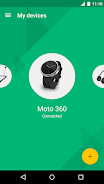
Manage your Motorola connected devices.

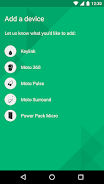
Motorola Connect currently supports Moto 360, Moto Pulse, Moto Surround, Motorola Power Pack Micro, and Motorola Keylink

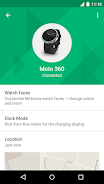
Moto 360: Customize your watch with one of Motorola’s exclusive watch faces, or create your own with the My Design option.

Moto Pulse: Locate your lost headphones on a map, check your battery status, and more.

Moto Surround: Locate your lost earbuds on a map, check your battery status, and control other settings on Moto Surround.

Power Pack Micro: Locate your lost power pack on a map and get notifications when your power pack needs to be recharged.

Motorola Keylink: Attach Motorola Keylink to your keys or any other item and use the app to locate it when it is misplaced.

Manage your Moto Body profile, view wellness data, and get personalized insights with the new phone app – now available for download. https://play.google.com/store/apps/details?id=com.motorola.omni
AD

Download APK (35 MB )

Frequently Asked Questions

What is the latest version of Motorola Connect?
The latest version of Motorola Connect is 2.10.20-339 (2221020).
Is Motorola Connect free to download?
Motorola Connect is free to download on Android, but may contain optional in-app purchases.
What is the APK file size of Motorola Connect?
The APK file size of Motorola Connect is 35 MB.
Is Motorola Connect safe and virus-free?
Yes, Motorola Connect is completely safe to download and install. The APK is sourced directly from Google Play and verified with the original developer certificate.
How to install Motorola Connect on Android?
Download the APK from this page. On your Android device, open the downloaded file, allow installation from unknown sources if prompted, then tap Install.