Introductions O2Cam
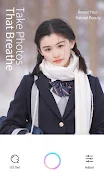
Take photos that breathe Take exquisite, natural-looking photos
Break through the limitations of smartphone photography and capture the delicate texture of your skin.Bring your natural, genuine beauty to life with O2Cam.
Take photos that look flawless in every detail.
All-new O2 Set and Adjust function
Grant your photos a high-quality, elegant look.
———Take photos that breathe———
#O2 Set
Noise, smoke & fog, window lights, flares... all elements help to create a great atmosphere.
Every set comes with tasteful filters and makeup looks customized by fashion experts.
Every set will make creating natural, exquisite photos easier than ever.
Just snap away and let O2Cam make all your dreams come true.
#Adjust
Dozens of delicate yet natural facial adjustments; preserve the look of the user's skin in the photo.
"Subtle yet detailed adjustments make customizing your makeup incredibly easy.
"
It is you to define beauty and delicacy.
#Smart AI
A brand-new algorithm that helps to automatically enhance and adjust photos according to the environment they're taken in.
Say no to boring selfies that all look the same! Customize your very own classy, elegant photo qualities and make your selfies pop.
With O2Cam, your photos express who you are