Introductions Verizon Messages
Stay connected using Verizon Messages on your Smartphone, tablet, and PC
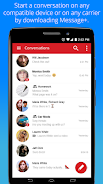
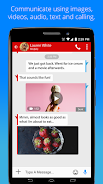
Stay connected using Verizon Messages sync features for your Smartphone, tablet, and computer. Keep the conversation going even when you’re switching between devices. Connect with family, friends, teammates, and more through personalized group chats, texts, photos, videos and gift cards worth up to $100 at stores like Starbucks, Dominos, and more. Now anyone can download and chat with Verizon Messages, even non Verizon customers (available on compatible devices).GROUP CHATS – Create larger group chats with up to 250 people. Send and receive photos/videos in seconds. Personalize your chat experience with avatars, backgrounds and more. You can even mute a conversation or add or remove members or without creating a new group.
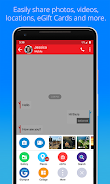
YELP INTEGRATION – Tap the plus menu and easily access Yelp from within the app. Search for restaurants, entertainment and directions. Make plans and share the details all within your chat.
SHARE YOUR LOCATION – Glympse™ lets you share your location with the people you choose for the length of time you set. Perfect for meeting up, or letting people know you’re running late.
SEND AN eGIFT – Tap the plus menu and select eGifts icon. Easily send an eGift card right through text message. eGifting has been expanded to include eGift cards from more than 30 brands
SYNC ACROSS DEVICES – Download Verizon Messages on all your devices, and sync messages across your smartphone, tablet and computer. Switch devices whenever you want. Make calls with your tablet anywhere.
DRIVING MODE – Turn on driving mode to send an Auto-Reply message and disable incoming message notifications so you don’t get distracted on the road.
HD VOICE CALLING – Eligibility rules apply. Link your phone number to the Verizon Messages app on your tablet and make and receive calls wherever they want on any network (cellular or Wi-Fi).
Other features:
# Schedule messages to be delivered at a specific date/time, even if your phone is turned off.
# Search the web for images and gifs to include in your chat with Yahoo search.
# Express yourself through colorful Emoji’s by tapping on highlighted keywords when composing messages.
# Send and receive messages over Wi-Fi from your smartphone, iOS device, tablet, PC, MAC, and web browser.
Need Help? Visit our Support Pages at
http://support.verizonwireless.com/clc/features/data_services/verizon-messages.html
View the complete Terms & Conditions at:
https://www.verizonwireless.com/support/verizon-messages-legal/
View the Verizon Messages privacy policy at:
https://www.verizon.com/about/privacy/verizon-messages-app-privacy-policy