Introductions WalkieTalkie
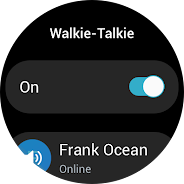
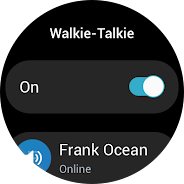
The Walkie-Talkie app is an exclusive Galaxy Watch app
"The Walkie-Talkie app is a Galaxy Watch-exclusive Wear OS app that allows two or more users to have instant conversations, just as if they were using a walkie-talkie.Create an instant Walkie-Talkie channel on your Galaxy Watch and enjoy instant conversations right away with the friends, colleagues, or family members that are in your Contacts and using the Watch.
[Key features]
1. Create one-on-one or group Walkie-Talkie chat rooms to talk to your friends
Create Walkie-Talkie chat rooms by choosing one of the following methods on the main screen of the Walkie-Talkie app
- Invite -> Contacts -> Select one or several friends to chat with from your friend list -> Set the chat room name and click “Done”
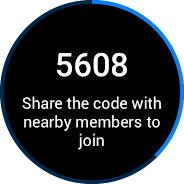
- Invite -> People nearby -> After setting the chat room name, click “Done” -> Share the PIN code displayed on the screen with nearby friends you want to invite
2. Join a chat room you were invited to
- Join a chat room by clicking the invitation notification message
- Join a chat room by selecting it from the ""Invitations"" list on the main screen of the Walkie-Talkie app
- Find a channel using the ""Search nearby"" feature on the main screen of the Walkie-Talkie app and enter the PIN code to join
3. Speak in the chat room
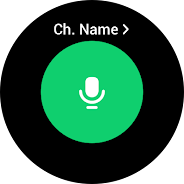
- Tap to enter the chat room, press and hold the Speak button to speak, and release the button to stop speaking.
- Change the Speak button to a toggle-type button by selecting ""How to talk ->Tap"" in the Walkie-Talkie app settings.
[Usage Environment]
Register your Samsung account on a Galaxy smartphone connected to your Galaxy Watch.
After installing the Walkie-Talkie app on your Galaxy Watch, when running the app for the first time, the Watch must be connected to a Galaxy smartphone with a phone number to sign up for the Walkie-Talkie service. We recommend using a Galaxy smartphone with Android version 8.0 or higher. After that, you can use the Walkie-Talkie app using your Watch’s network connection or the network connection of the smartphone to which your Watch is connected.
※ You do not need to install a separate Walkie-Talkie app for your Galaxy smartphone.
※ Models that support the Walkie-Talkie app(WearOS): Galaxy Watch 4, Galaxy Watch 4 Classic, Galaxy Watch 5, Galaxy Watch 5 Pro and Galaxy Watch models launched afterward
※ Access permission information
The following access permissions are required to provide you with this service. Basic features of the service can be used even if optional access permissions are not granted.
[Required Permissions]
- Microphone: To receive voice input from the microphone for Walkie-Talkie conversations and to transmit your voice to the other party
- Contacts: To identify friends that you can use the Walkie-Talkie with based on your Contacts
- Call: To limit the Walkie-Talkie feature when you receive a call during a conversation on the Walkie-Talkie app
- Nearby device: To configure channels with nearby friends
[Optional Permissions]
- Location: To configure channels by finding nearby friends using Bluetooth"
- Notification: To receive notifications