Write on PDF

Write on PDF

Samsung Electronics Co., Ltd.
v2.6.03.9 (260309000) • Updated May 24, 2025
3.7 ★
35,244 Reviews
100,000,000+
Downloads
Android 8.0+
Requires
AD
Name Write on PDF
Android Version 8.0
Publisher Samsung Electronics Co., Ltd.
Genre PRODUCTIVITY
Size 18 MB
Version 2.6.03.9 (260309000)
Last updated on 2025-05-24
Downloads 100,000,000+
Get it On Google Play


Download Write on PDF Android

Download APK (18 MB )

Introductions Write on PDF

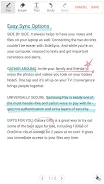
Open a PDF file and write on it.

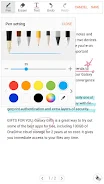
Write on PDF is a convenient PDF annotator for you.
You can take notes by your own handwriting with a variety of Pen and tools.

• Features :
- List of all PDF files in your device
- Save a PDF file with your text and drawing content
- Share a PDF file
- PDF viewer

• The following permissions are required for the app service. For optional permissions, the default functionality of the service is turned on, but not allowed.
[Required permissions]
- Storage: To access the PDF files stored on your phone.
[Optional permissions]
- Contacts: To access the PDF filse stored on Google Drive.
- Phone: To access the PDF filse stored on Google Drive.
- Nearby Devices: Pen stroke, eraser sound support (Android 12 or higher)
AD

Download APK (18 MB )

Frequently Asked Questions

What is the latest version of Write on PDF?
The latest version of Write on PDF is 2.6.03.9 (260309000).
Is Write on PDF free to download?
Write on PDF is free to download on Android, but may contain optional in-app purchases.
What is the APK file size of Write on PDF?
The APK file size of Write on PDF is 18 MB.
Is Write on PDF safe and virus-free?
Yes, Write on PDF is completely safe to download and install. The APK is sourced directly from Google Play and verified with the original developer certificate.
How to install Write on PDF on Android?
Download the APK from this page. On your Android device, open the downloaded file, allow installation from unknown sources if prompted, then tap Install.