Microsoft Surface

Microsoft Surface

Microsoft Corporation
v2.1724.0 (79580338) • Updated Mar 17, 2026
3.3 ★
1,620 Reviews
500,000+
ডাউনলোড
Android 7.0+
Requires
AD
নাম Microsoft Surface
অ্যান্ড্রয়েড সংস্করণ 7.0
প্রকাশক Microsoft Corporation
টাইপ MUSIC AND AUDIO
আকার 63 MB
সংস্করণ 2.1724.0 (79580338)
সর্বশেষ আপডেট 2026-03-17
ডাউনলোড 500,000+
এটি চালু করুন Google Play


ডাউনলোড করুন Microsoft Surface Android

Download APK (63 MB )

Introductions Microsoft Surface

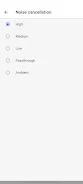
Update Surface Earbuds and Surface Headphones and customize settings for them.

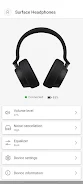
The Surface app is the companion to Surface Earbuds and Surface Headphones. Update your earbuds and headphones, and customize settings to get the most out of them.

Here are the things you can do:
• Update your earbuds and headphones
• View and change device info
• View battery info and volume level
• Personalize settings
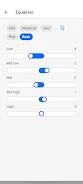
• Change equalizer settings to get the sound you want
• Control which devices are connected
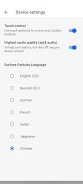
• Change language settings
• Reset your earbuds and headphones to the factory settings
• Watch tutorial videos
• Send us feedback

Please refer to Microsoft’s End User License Agreement (EULA) for Terms of Service for Surface app. By installing the app, you agree to these terms and conditions. Microsoft’s privacy statement is available at https://privacy.microsoft.com/en-us/privacystatement
AD

Download APK (63 MB )

Frequently Asked Questions

What is the latest version of Microsoft Surface?
The latest version of Microsoft Surface is 2.1724.0 (79580338).
Is Microsoft Surface free to download?
Microsoft Surface is free to download on Android, but may contain optional in-app purchases.
What is the APK file size of Microsoft Surface?
The APK file size of Microsoft Surface is 63 MB.
Is Microsoft Surface safe and virus-free?
Yes, Microsoft Surface is completely safe to download and install. The APK is sourced directly from Google Play and verified with the original developer certificate.
How to install Microsoft Surface on Android?
Download the APK from this page. On your Android device, open the downloaded file, allow installation from unknown sources if prompted, then tap Install.