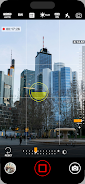
Introductions Zoom Camera
Capture stunning photos with 15x zoom, HDR, low light, and camera effects.
Zoom Camera: Capture Every Detail!Discover the ultimate camera app with Zoom Camera. This powerful app enhances your photography experience, letting you zoom up to 15x zoom using GPU technology for crystal-clear close-ups. Whether you're capturing a scenic landscape, a close-up shot, or moments in low light, Zoom Camera has you covered.
• Achieve up to 15x zoom for unparalleled detail with Extreme Zoom
• Control camera exposure to capture stunning photos and videos in dim conditions with Low-Light Mastery
• Switch between Auto, On, or Off for perfect lighting every time with Flash Modes
• Adjust White Balance Options to ensure natural-looking colors
• Add a classic touch to your photos with Black & White Mode
• Capture vibrant, high-contrast photos with enhanced color and detail using HDR Mode
• View, manage, and share your captured photos and videos easily with the built-in gallery
With photo editing features, exposure control, flash modes, and HDR, Zoom Camera lets you take your photos and videos to the next level. Download now and elevate your photography skills with this professional camera app!