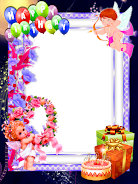
Birthday Photo Frames
Introductions Birthday Photo Frames
Now frame this special occasion with style & elegance with Birthday Photo Frames
Happy Birthday Photo Frame,This Birthday Photo Frames app is used to give a lovely and creative touch(like greeting cards) to your pictures with these awesome Happy Birthday Frames and make your most important day unforgettable via your android phone.
This Happy Birthday Photo Frames has a simple and unique user interface that makes every Photo something to remember by.
Happy Birthday Photo Frames app has unique and latest collection of Happy Birthday Photo Frames with various options to make your photos look more interesting.
With Birthday Frames, you can manage your saved Birthday images with many functions as share, delete, view detail, etc. And you can also share your Birthday images with your friends on social networks.
With Birthday Photo Frames, You can create a beautiful birthday greetings for your family and friends.
Come capture the moment with us.
Features:
►Easily decorate your birthday images with these birthday photo frame on your mobile phone to make your memories unforgettable.
►Add Sticker, Text.
►Scale, Rotate, Zoom in / Zoom out or drag the photo to fit the frame as needed.
►You can save them and start sharing with social network like Facebook, Gmail etc.
►Happy Birthday Frames.
►Birthday Cards Maker:-Photo frame.
►Birthday Photo Frames Editor.
►Birthday Photo decorator.
►Simple User Interface.
►Happy Birthday Photo Frames 2019
►Easily View / Delete your decorated birthday images.
How to USE?
► Select Photo Frame
► Select image from your gallery
► Adjust photo to fit the frame (scale, rotate, zoom in/ zoom out, drag)
► Apply text (if you want)
► Select sticker (if you want)
► Click on “Save” Button
► Easily share your decorated photo with your friends