Miami MDT Bus Tracker

Miami MDT Bus Tracker

Goder Hsu
v1.615 (615) • Updated Mar 17, 2026
4.7 ★
156 Reviews
10,000+
Downloads
Android 7.0+
Requires
AD
Nome Miami MDT Bus Tracker
Versione Android 7.0
Editore Goder Hsu
Genre TRAVEL AND LOCAL
Size 13 MB
Versione 1.615 (615)
Ultimo aggiornamento il 2026-03-17
Downloads 10,000+
Accendilo Google Play


Download Miami MDT Bus Tracker Android

Download APK (13 MB )

Introductions Miami MDT Bus Tracker

Tracciamento in tempo reale per Miami-Dade Transit (MDT)

Fornire monitoraggio e orari in tempo reale per il transito Miami-Dade (autobus / tram / treno)

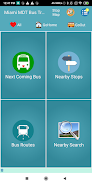
1. Fermate nelle vicinanze
- Fornire tutte le fermate degli autobus nelle vicinanze ordinate in base alla distanza dalla posizione corrente
- Fare clic su una fermata dell'autobus specifica per visualizzare tutte le linee di autobus tramite la fermata
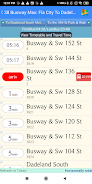
- Fare clic su un percorso specifico per visualizzare ulteriormente tutte le sequenze di fermate e i loro tempi di arrivo stimati
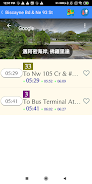
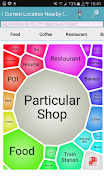
- Facendo clic su una fermata specifica, puoi esplorare ulteriormente la fermata nelle vicinanze delle cose POI.

2. Informazioni sui percorsi degli autobus
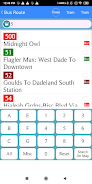
- Ricerca di informazioni specifiche sull'autobus utilizzando il numero del percorso, il numero della fermata o il nome della fermata parziale
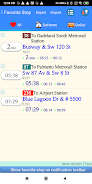
- Fornire percorso di autobus frequentemente utilizzato per una rapida selezione.
AD

Download APK (13 MB )

Frequently Asked Questions

What is the latest version of Miami MDT Bus Tracker?
The latest version of Miami MDT Bus Tracker is 1.615 (615).
Is Miami MDT Bus Tracker free to download?
Miami MDT Bus Tracker is free to download on Android, but may contain optional in-app purchases.
What is the APK file size of Miami MDT Bus Tracker?
The APK file size of Miami MDT Bus Tracker is 13 MB.
Is Miami MDT Bus Tracker safe and virus-free?
Yes, Miami MDT Bus Tracker is completely safe to download and install. The APK is sourced directly from Google Play and verified with the original developer certificate.
How to install Miami MDT Bus Tracker on Android?
Download the APK from this page. On your Android device, open the downloaded file, allow installation from unknown sources if prompted, then tap Install.