Introductions Verizon Content Transfer - Content Transfer
Transfer photos, videos, music and more from your old device to a new device.
With the cross-platform Verizon Content Transfer app, it's easy to transfer your contacts and other content from your old phone to your new phone, without the need for wires, subscribed services or additional equipment. Enjoy the data backup available in the Verizon Cloud whenever you need it.
Verizon Content Transfer lets you:
• Copy your personal data from one phone to another easily.
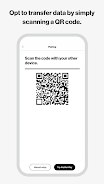
• Choose to transfer data by simply scanning a QR code.
• Transfer photos and videos, as well as contacts, music, documents, call logs, messages, applications, and calendars.
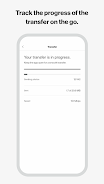
• Track the progress of the transfer on the go.
Download the Verizon Content Transfer app now and start transferring all your stuff, so you can enjoy your new phone.
What is the latest version of Verizon Content Transfer - Content Transfer?
The latest version of Verizon Content Transfer - Content Transfer is 4.1.713-RELEASE (713).
Is Verizon Content Transfer - Content Transfer free to download?
Verizon Content Transfer - Content Transfer is free to download on Android, but may contain optional in-app purchases.
What is the APK file size of Verizon Content Transfer - Content Transfer?
The APK file size of Verizon Content Transfer - Content Transfer is 5 MB.
Is Verizon Content Transfer - Content Transfer safe and virus-free?
Yes, Verizon Content Transfer - Content Transfer is completely safe to download and install. The APK is sourced directly from Google Play and verified with the original developer certificate.
How to install Verizon Content Transfer - Content Transfer on Android?
Download the APK from this page. On your Android device, open the downloaded file, allow installation from unknown sources if prompted, then tap Install.