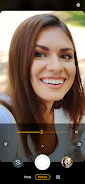
Moto Camera 3

Moto Camera 3

Motorola Mobility LLC.
v9.1.52.60 (90015260) • Updated Mar 17, 2026
3.7 ★
62,160 Reviews
100,000,000+
Загрузки
Android 5.1++
Requires
AD
Название Moto Camera 3
Версия Android 5.1+
Издатель Motorola Mobility LLC.
Жанр PHOTOGRAPHY
Размер 182 MB
Версия 9.1.52.60 (90015260)
Последнее обновление 2026-03-17
Загрузки 100,000,000+
Скачать на Google Play


Скачать Moto Camera 3 Android

Download APK (182 MB )

Introductions Moto Camera 3

Fast, simple, stunning photo and video capture.

Requirements - Moto Camera 3 is only compatible with select devices launched in 2020 and beyond.
Redesigned for reachability and one hand usage, Moto Camera 3 is packed with amazing features to capture the perfect moment, each and every time.
Features:
Quick Capture - Never miss a moment. Launch the camera with a simple twist of your wrist, then twist again to switch cameras.
Portrait - Add a nice background blur to your photos. Also, adjust your blur level or change to black and white in Google Photos.
Pro mode - Put yourself in complete control of focus, white balance, shutter speed, ISO, and exposure.
Spot Color - Select one color while everything else becomes black and white.
Google Lens - Use Lens to search what you see, scan text and translate, and interact with the world.
Google Photos - Select the thumbnail for sharing, editing, and backup in Google Photos.
And much more!
AD

Download APK (182 MB )

Часто задаваемые вопросы

Какая последняя версия Moto Camera 3?
Последняя версия Moto Camera 3 — 9.1.52.60 (90015260).
Является ли Moto Camera 3 бесплатным?
Moto Camera 3 бесплатен на Android, но может содержать встроенные покупки.
What is the APK file size of Moto Camera 3?
The APK file size of Moto Camera 3 is 182 MB.
Безопасен ли Moto Camera 3 и не содержит вирусов?
Да, Moto Camera 3 полностью безопасен. APK получен напрямую из Google Play и проверен оригинальным сертификатом разработчика.
Как установить Moto Camera 3 на Android?
Скачайте APK с этой страницы. Откройте файл на Android, разрешите установку из неизвестных источников, затем нажмите Установить.