Pixel Town Craft: Blocky Roads

Pixel Town Craft: Blocky Roads

SBlazer
v2.1 (5) • Updated Sep 22, 2024
3.9 ★
2,434 Reviews
1,000,000+
ดาวน์โหลด
Android 6.0+
Requires
AD
ชื่อ Pixel Town Craft: Blocky Roads
เวอร์ชัน Android 6.0
สำนักพิมพ์ SBlazer
Genre GAME RACING
ขนาด 30 MB
เวอร์ชัน 2.1 (5)
อัปเดตครั้งล่าสุดเมื่อ 2024-09-22
ดาวน์โหลด 1,000,000+
รับมันบน Google Play


ดาวน์โหลด Pixel Town Craft: Blocky Roads Android

Download APK (30 MB )

Introductions Pixel Town Craft: Blocky Roads

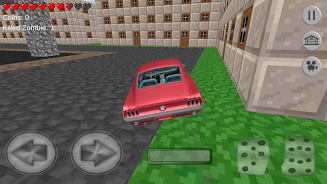
การเอาชีวิตรอดและงานฝีมือบนถนนที่ปิดกั้นเมืองเหมืองในการแข่งขันพิกเซลกับก้อนซอมบี้

ขับรถของคุณบนถนนที่ปิดกั้นของเมืองพิกเซลและฆ่าซอมบี้! หรือซอมบี้ฆ่าคุณ คุณสามารถปรับปรุงรถบล็อคของคุณในโรงรถ เอาตัวรอดและประดิษฐ์ในบล็อกเมืองใหญ่!

- ยานแข่งรถเร็วในเมืองพิกเซลที่เต็มไปด้วยซอมบี้
- เนินเขาขนาดใหญ่และเมืองเล็ก ๆ สองแห่ง
- ขับรถจากบุคคลที่สาม
- ปีนเคาน์เตอร์ซอมบี้ถูกฆ่า
- กราฟิกที่ทันสมัยและฟิสิกส์ที่สมจริง
- เก็บเหรียญเพื่อสร้างเครื่องจักร
- ในโรงรถ - คุณสามารถปรับปรุงรถและงานหัตถกรรมของคุณ
- คุณสามารถเรียกรถบรรทุกพ่วงได้หากรถของคุณติดขัด

เกมนี้เป็นเกมซอมบี้ไม่ใช่แอปพลิเคชั่นอย่างเป็นทางการของ Mojang บริษัท SBlazer ไม่มีส่วนเกี่ยวข้องกับ Mojang AB Minecraft เป็นเครื่องหมายการค้าของ Mojang AB และผลิตภัณฑ์ Minecraft ไม่มีส่วนเกี่ยวข้องกับผู้สร้างเกมนี้หรือผู้อนุญาต และไม่ได้รับการอนุมัติจากพวกเขา
AD

Download APK (30 MB )

Frequently Asked Questions

What is the latest version of Pixel Town Craft: Blocky Roads?
The latest version of Pixel Town Craft: Blocky Roads is 2.1 (5).
Is Pixel Town Craft: Blocky Roads free to download?
Pixel Town Craft: Blocky Roads is free to download on Android, but may contain optional in-app purchases.
What is the APK file size of Pixel Town Craft: Blocky Roads?
The APK file size of Pixel Town Craft: Blocky Roads is 30 MB.
Is Pixel Town Craft: Blocky Roads safe and virus-free?
Yes, Pixel Town Craft: Blocky Roads is completely safe to download and install. The APK is sourced directly from Google Play and verified with the original developer certificate.
How to install Pixel Town Craft: Blocky Roads on Android?
Download the APK from this page. On your Android device, open the downloaded file, allow installation from unknown sources if prompted, then tap Install.