Disney Color and Play
Introductions Disney Color and Play
Kolor i grać ze swoimi ulubionymi postaciami Disneya.
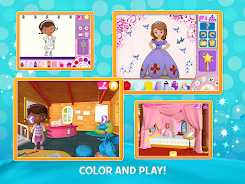
Explore the Disney universe in a whole new way as you create, color, play with and animate your favorite Disney characters.With Disney Color and Play you can:
- Creatively color characters and scenes anyway you like
- Play with your creations in our Disney playrooms*
- Watch your characters leap off the screen in 3D!
- Pair the app with Disney Color and Play coloring books and watch your drawings come to life in the app!
FEATURES:
- Enjoy the Mickey Mouse Clubhouse coloring page for FREE
- To add more content, purchase additional coloring pages and playrooms within the app
- Explore playrooms for Doc McStuffins, Mickey Mouse Clubhouse and Sofia The First
- Enjoy animated mazes, word searches, and jigsaw puzzles with your Disney Color and Play coloring pages!
- Perfect for creative kids, color and paint Disney favorites with endless combinations of tools, colors, patterns, stickers and more!
- Use real coloring books (please check availability) or buy and print pages online!
Additional characters include:
- Disney Princesses
- Cars 3
- Mickey and the Roadster Racers
- Minnie’s Happy Helpers
- Puppy Dog Pals
- Frozen
- Finding Dory
- Elena of Avalor
- Inside Out
- Doc McStuffins
- Sofia the First
- Mickey Mouse Clubhouse
- Big Hero 6
- Palace Pets in Whisker Haven
- The Good Dinosaur
- The Lion Guard
- Miles from Tomorrow
*Playrooms are 3D digital stages, designed to mimic physical playsets or dollhouses
If you’re experiencing difficulties with audio, check the audio settings within your device to see if your device is muted. If you experience difficulties printing from your device, simply move the saved page to your computer and print from there. Don’t hesitate to visit customer care at https://storytoys.com/support.
Before you download this experience, note this app will request access to your device’s camera and external storage to take a picture; upload and save content from the app to your device; and will record audio to the app.
Privacy Policy – https://storytoys.com/privacy