ASUS Weather

ASUS Weather

Mobile, ASUSTek Computer Inc.
v31.2.1.12_220718 (1810201060) • Updated Mar 17, 2026
4.1 ★
446,186 Reviews
100,000,000+
ดาวน์โหลด
Android 9.0+
Requires
AD
ชื่อ ASUS Weather
เวอร์ชัน Android 9.0
สำนักพิมพ์ Mobile, ASUSTek Computer Inc.
Genre WEATHER
ขนาด 10 MB
เวอร์ชัน 31.2.1.12_220718 (1810201060)
อัปเดตครั้งล่าสุดเมื่อ 2026-03-17
ดาวน์โหลด 100,000,000+
รับมันบน Google Play


ดาวน์โหลด ASUS Weather Android

Download APK (10 MB )

Introductions ASUS Weather

ใช้ประโยชน์จากทุกวันแดด

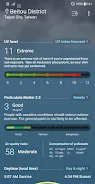
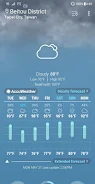
อัสซุอากาศ app มาพร้อมกับRealFeel®
มันเป็นดัชนีอุณหภูมิแรกที่จะคำนึงถึงปัจจัยหลายบัญชีเพื่อตรวจสอบว่าร้อนหรือเย็นคุณรู้สึกเพื่อให้คุณสามารถกำหนดวิธีการแต่งตัว

คุณยังสามารถเพิ่มวิดเจ็ต ASUS สภาพอากาศในหน้าจอหลักของคุณและสามารถปรับแต่งการแสดงสภาพอากาศที่คุณอยู่ที่คุณกำลังจะไปหรือที่คุณฝันเกี่ยวกับการไป - ที่ใดก็ได้ในโลก!

คุณสมบัติที่สำคัญ
- RealFeel®ข้อมูลอุณหภูมิด้วยแผนภูมิในชีวิตประจำวัน
- การคาดการณ์อุณหภูมิรายวัน, มีความคิดฟุ้งซ่านในชีวิตประจำวันและต่ำ
- 7 วันคาดการณ์
- รังสีอัลตราไวโอเลต (UV) ดัชนี
- พระอาทิตย์ขึ้นและพระอาทิตย์ตกเวลา
- ไต้หวัน / จีนภูมิภาค: ให้มลภาวะมาตรฐานดัชนี (PSI) กับข้อมูลตามเวลาจริงใน PM2.5 และมลพิษทางอากาศอื่น ๆ
- การแจ้งเตือนสภาพอากาศเลวร้ายเช่นลมฝนตกหนักหิมะตกหนักพายุทรายหมอกควัน ฯลฯ

หมายเหตุ
1. เพื่อความถูกต้องและ up-to-date ข้อมูลสภาพอากาศ, โปรดตรวจสอบว่าคุณกำลังเชื่อมต่อ Wi-Fi หรือเครือข่ายข้อมูลโทรศัพท์มือถือเมื่อใช้ ASUS อากาศ
2. โปรดเปิดใช้งานคุณลักษณะตรวจสอบตำแหน่งของอุปกรณ์ของคุณจะได้รับข้อมูลสภาพอากาศในท้องถิ่น
AD

Download APK (10 MB )

Frequently Asked Questions

What is the latest version of ASUS Weather?
The latest version of ASUS Weather is 31.2.1.12_220718 (1810201060).
Is ASUS Weather free to download?
ASUS Weather is free to download on Android, but may contain optional in-app purchases.
What is the APK file size of ASUS Weather?
The APK file size of ASUS Weather is 10 MB.
Is ASUS Weather safe and virus-free?
Yes, ASUS Weather is completely safe to download and install. The APK is sourced directly from Google Play and verified with the original developer certificate.
How to install ASUS Weather on Android?
Download the APK from this page. On your Android device, open the downloaded file, allow installation from unknown sources if prompted, then tap Install.