Brother Print Service Plugin
Introductions Brother Print Service Plugin
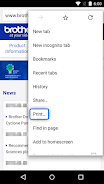
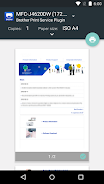
可由Android app中內建的列印選項使用brother印表機列印
安裝Brother Print Service Plugin後即可由Android裝置(Android 5.0版以上)經由無線網路連接brother印表機直接列印。此應用功能可支援其他Android app的"列印"選項,支援的app請見下列。(更新至2015年三月)- Chrome 瀏覽器
- Gmail
- Photos
- Google Sheets
- Google Slides
- Google Docs
- Google Drive
支援以下列印選項(依據行動裝置支援功能可能有差異)
- 複印
- 紙張尺寸
- 彩色列印/黑白列印
- 方向
- 紙張種類
- 列印品質
- 版面配置
- 雙面列印
- 無邊界列印
安裝Brother Print Service Plugin之後,請先執行以下步驟啟動(擇一)
- 安裝之後立即點選彈出的通知訊息啟動
- 在Android裝置中點選"設定"->"列印"然後點選"Brother Print Service Plugin"啟動
請參考您的地區brother官網了解支援的型號資訊
為協助我們改善應用程式,將您的意見傳送至 [email protected]。請注意,我們可能無法回覆個人的電子郵件。