Brother Print Service Plugin
Introductions Brother Print Service Plugin
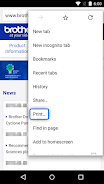
您可以使用Android应用程序的内置菜单Brother打印机打印。
Brother 打印服务插件使您可以通过 Wi-Fi 网络直接从 Android 设备(Android 5.0 或更高版本)打印到 Brother 打印机。由于这是一个插件应用程序,您可以使用支持的 Android 应用程序的“打印”选项进行打印。请参阅下文了解支持的应用程序(截至 2015 年 3 月):- Chrome 浏览器
- 邮箱
- 照片
- 谷歌表格
- 谷歌幻灯片
- 谷歌文档
- 谷歌云端硬盘
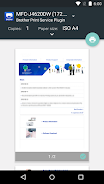
提供以下打印选项(兼容选项取决于所选设备):
- 副本
- 纸张尺寸
- 彩色/单色
- 方向
- 媒体类型
- 质量
- 布局
- 2面
- 无边框
安装此应用程序后,您必须通过以下方式之一激活它:
- 安装后立即点击通知区域中显示的图标,并在显示的屏幕中启用它。
- 点击 Android 设备上的“设置”并点击“打印”,然后选择“Brother 打印服务插件”。在显示的屏幕中启用它。
请访问您当地的 Brother 网站了解支持的型号。
为了帮助我们改进应用程序,请将您的反馈发送至 [email protected]。请注意,我们可能无法回复个别电子邮件。