HiCare

HiCare

Huawei Internet Services
v15.1.6.301 (1501006301) • Updated Mar 04, 2026
4.1 ★
126,323 Reviews
500,000,000+
Downloads
Android 6.0+
Requires
AD
Name HiCare
Android Version 6.0
Publisher Huawei Internet Services
Genre TOOLS
Size 161 MB
Version 15.1.6.301 (1501006301)
Last updated on 2026-03-04
Downloads 500,000,000+
Get it On Google Play


Download HiCare Android

Download APK (161 MB )

Introductions HiCare

HiCare provides professional customer assistance services for Huawei devices.

"HiCare provides professional customer assistance services for Huawei devices.
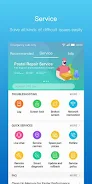
HiCare provides you with common online services including customer services, issue feedback, user guides, service centers and self-service. HiCare aims to offer a one-stop shop for after-sales services in order to quickly identify and resolve any issues you encounter.
1. Service centers
Search for the addresses and numbers of your local service centers.
2. Hotline numbers
Search for your local hotline numbers and working hours.
3. Warranty policy
Search for Huawei’s after-sales warranty policy in your region.
4. Manuals
Provide you with a user manual that contains comprehensive function descriptions.
5. Forum
Provide you a place where you can communicate with other local phone users.
6. Warranty status
You can check the device warranty information.
7. Accessories price
You can query screen, motherboard, camera and other accessories prices.

AD

Download APK (161 MB )

Frequently Asked Questions

What is the latest version of HiCare?
The latest version of HiCare is 15.1.6.301 (1501006301).
Is HiCare free to download?
HiCare is free to download on Android, but may contain optional in-app purchases.
What is the APK file size of HiCare?
The APK file size of HiCare is 161 MB.
Is HiCare safe and virus-free?
Yes, HiCare is completely safe to download and install. The APK is sourced directly from Google Play and verified with the original developer certificate.
How to install HiCare on Android?
Download the APK from this page. On your Android device, open the downloaded file, allow installation from unknown sources if prompted, then tap Install.