Digital Wellbeing

Digital Wellbeing

Google LLC
v1.39.892086365.beta (814538) (814538) • Updated Mar 17, 2026
3.6 ★
1,375,718 Reviews
5,000,000,000+
Downloads
Android 9.0+
Requires
AD
Name Digital Wellbeing
Android Version 9.0
Publisher Google LLC
Genre TOOLS
Size 25 MB
Version 1.39.892086365.beta (814538) (814538)
Last updated on 2026-03-17
Downloads 5,000,000,000+
Get it On Google Play


Download Digital Wellbeing Android

Download APK (25 MB )

Introductions Digital Wellbeing

Improve your wellbeing and disconnect more easily

See a complete picture of your digital habits and disconnect when you want to.

Get a daily view of your digital habits:
• How frequently you use different apps
• How many notifications you receive
• How often you check your phone or unlock your device

Disconnect when you want to:
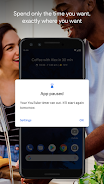
• Daily app timers let you set limits for how much you use apps.
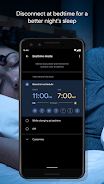
• Bedtime mode reminds you to switch off at night, setting a schedule to fade your screen to Grayscale while Do Not Disturb silences notifications for a good night’s sleep.
• Focus mode lets you pause distracting apps with a single tap so you can better focus your time. You can also set a schedule to turn on Focus mode automatically and reduce distractions while you’re at work, school, or home.

Get started:
• Look for Digital Wellbeing in your phone’s Settings menu

Have a question? Check out the Help Center: https://support.google.com/android/answer/9346420
AD

Download APK (25 MB )

Frequently Asked Questions

What is the latest version of Digital Wellbeing?
The latest version of Digital Wellbeing is 1.39.892086365.beta (814538) (814538).
Is Digital Wellbeing free to download?
Digital Wellbeing is free to download on Android, but may contain optional in-app purchases.
What is the APK file size of Digital Wellbeing?
The APK file size of Digital Wellbeing is 25 MB.
Is Digital Wellbeing safe and virus-free?
Yes, Digital Wellbeing is completely safe to download and install. The APK is sourced directly from Google Play and verified with the original developer certificate.
How to install Digital Wellbeing on Android?
Download the APK from this page. On your Android device, open the downloaded file, allow installation from unknown sources if prompted, then tap Install.