Moto File Manager

Moto File Manager

Motorola Mobility LLC.
vv5.0.05 (50000005) • Updated May 24, 2025
3.8 ★
69,399 Reviews
50,000,000+
ดาวน์โหลด
Android 5.1++
Requires
AD
ชื่อ Moto File Manager
เวอร์ชัน Android 5.1+
สำนักพิมพ์ Motorola Mobility LLC.
Genre TOOLS
ขนาด 6 MB
เวอร์ชัน v5.0.05 (50000005)
อัปเดตครั้งล่าสุดเมื่อ 2025-05-24
ดาวน์โหลด 50,000,000+
รับมันบน Google Play


ดาวน์โหลด Moto File Manager Android

Download APK (6 MB )

Introductions Moto File Manager

Motorola File Manager เป็นวิธีที่ง่ายในการค้นหาถ่ายโอนและแก้ไขไฟล์

จัดการไฟล์ของคุณอย่างมีประสิทธิภาพและง่ายดายด้วย Motorola File Manager!
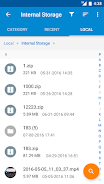
Motorola File Manager ช่วยให้คุณจัดการไฟล์ทั้งหมดของคุณไม่ว่าจะเก็บไว้ในที่เก็บข้อมูลหลักหรือการ์ด microSD
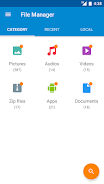
-File category - เรียกดูไฟล์ได้อย่างง่ายดายตามหมวดหมู่จากหน้าจอหลักของ Motorola File Manager: รูปภาพเพลงวิดีโอที่เก็บถาวรเอกสารและไฟล์ล่าสุด เป็นการเข้าถึงไฟล์ที่รวดเร็วและง่ายดายในแต่ละหมวดหมู่
การดำเนินการ -File - ช่วยให้คุณสามารถคัดลอกย้ายเปลี่ยนชื่อลบบีบอัดและคลายไฟล์ ZIP สร้างไฟล์ ZIP ที่เข้ารหัสและแชร์ไฟล์
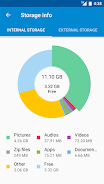
ข้อมูลการจัดเก็บ - สามารถดูตำแหน่งของไฟล์แต่ละประเภทและการใช้การ์ด SD ได้อย่างง่ายดาย
-One key transfer - คลิกเดียวเพื่อถ่ายโอนไฟล์รูปภาพเพลงและวิดีโอทั้งหมดจากที่เก็บข้อมูลภายในของโทรศัพท์ไปยังการ์ด SD ภายนอก ไฟล์ที่ถ่ายโอนจะถูกเก็บไว้ในโฟลเดอร์ FileBrowser ในการ์ด SD ภายนอก
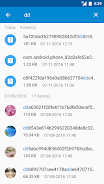
-Global search - ค้นหาในโฟลเดอร์และไฟล์ทั้งหมดของอุปกรณ์
- การจัดการระยะไกล - เรียกดูไฟล์บนอุปกรณ์จากคอมพิวเตอร์ของคุณด้วยการจัดการระยะไกล
AD

Download APK (6 MB )

Frequently Asked Questions

What is the latest version of Moto File Manager?
The latest version of Moto File Manager is v5.0.05 (50000005).
Is Moto File Manager free to download?
Moto File Manager is free to download on Android, but may contain optional in-app purchases.
What is the APK file size of Moto File Manager?
The APK file size of Moto File Manager is 6 MB.
Is Moto File Manager safe and virus-free?
Yes, Moto File Manager is completely safe to download and install. The APK is sourced directly from Google Play and verified with the original developer certificate.
How to install Moto File Manager on Android?
Download the APK from this page. On your Android device, open the downloaded file, allow installation from unknown sources if prompted, then tap Install.