Moto File Manager

Moto File Manager

Motorola Mobility LLC.
vv5.0.05 (50000005) • Updated May 24, 2025
3.8 ★
69,399 Reviews
50,000,000+
下載
Android 5.1++
Requires
AD
姓名 Moto File Manager
安卓版本 5.1+
出版商 Motorola Mobility LLC.
類型 TOOLS
尺寸 6 MB
版本 v5.0.05 (50000005)
最後更新於 2025-05-24
下載 50,000,000+
Get it On Google Play


下載 Moto File Manager Android

Download APK (6 MB )

Introductions Moto File Manager

Motorola File Manager提供了一種查找,傳輸和編輯文件的簡便方法

使用Motorola File Manager高效,輕鬆地管理文件!
摩托羅拉文件管理器可幫助您處理所有文件,無論它們是存儲在設備的主存儲器還是microSD卡中。
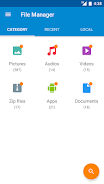
- 文件類別 - 直接從Motorola File Manager的主屏幕按類別瀏覽文件:圖片,音樂,視頻,存檔,文檔和最近的文件。可以快速輕鬆地訪問每個類別中的文件。
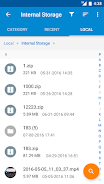
- 文件操作 - 允許您複製,移動,重命名,刪除,壓縮和解壓縮ZIP文件,創建加密的ZIP文件和共享文件。
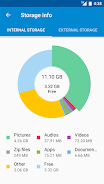
- 存儲信息 - 輕鬆查看每個類別文件的位置和SD卡使用情況。
- 一鍵傳輸 - 單擊即可將所有圖片,音樂和視頻文件從手機的內部存儲器傳輸到外部SD卡。傳輸的文件存儲在外部SD卡的FileBrowser文件夾中。
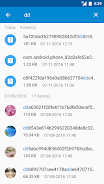
- 全局搜索 - 搜索設備的所有文件夾和文件。
- 遠程管理 - 通過遠程管理方便地從計算機上瀏覽設備上的文件。
AD

Download APK (6 MB )

Frequently Asked Questions

What is the latest version of Moto File Manager?
The latest version of Moto File Manager is v5.0.05 (50000005).
Is Moto File Manager free to download?
Moto File Manager is free to download on Android, but may contain optional in-app purchases.
What is the APK file size of Moto File Manager?
The APK file size of Moto File Manager is 6 MB.
Is Moto File Manager safe and virus-free?
Yes, Moto File Manager is completely safe to download and install. The APK is sourced directly from Google Play and verified with the original developer certificate.
How to install Moto File Manager on Android?
Download the APK from this page. On your Android device, open the downloaded file, allow installation from unknown sources if prompted, then tap Install.