Moto File Manager

Moto File Manager

Motorola Mobility LLC.
vv5.0.05 (50000005) • Updated May 24, 2025
3.8 ★
69,399 Reviews
50,000,000+
Downloads
Android 5.1++
Requires
AD
Name Moto File Manager
Android Version 5.1+
Publisher Motorola Mobility LLC.
Genre TOOLS
Size 6 MB
Version v5.0.05 (50000005)
Last updated on 2025-05-24
Downloads 50,000,000+
Get it On Google Play


Download Moto File Manager Android

Download APK (6 MB )

Introductions Moto File Manager

Motorola File Manager provides an easy way to find, transfer and edit files

Manage your files efficiently and easily with Motorola File Manager!
Motorola File Manager helps you handle all your files whether they are stored in your device's main storage or microSD card.
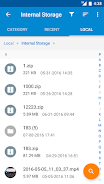
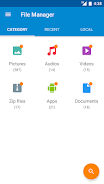
-File category - Browse files easily by category right from Motorola File Manager’s home screen: picture, music, videos, archive, documents and recent files. It’s quick and easy to access files in each category.
-File operations - allows you to copy, move, rename, delete, compress and decompress ZIP files, create encrypted ZIP files and share files.
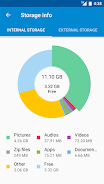
-Storage info - Easily see the location of each category file and the SD card usage.
-One key transfer - One click to transfer all picture, music and video files from the phone’s internal storage to the external SD card. Transferred files are stored in the FileBrowser folder in the external SD card.
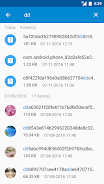
-Global search - Search in all folders and files of the device.
-Remote Management - Conveniently browse files on the device from your computer with remote management.
AD

Download APK (6 MB )

Frequently Asked Questions

What is the latest version of Moto File Manager?
The latest version of Moto File Manager is v5.0.05 (50000005).
Is Moto File Manager free to download?
Moto File Manager is free to download on Android, but may contain optional in-app purchases.
What is the APK file size of Moto File Manager?
The APK file size of Moto File Manager is 6 MB.
Is Moto File Manager safe and virus-free?
Yes, Moto File Manager is completely safe to download and install. The APK is sourced directly from Google Play and verified with the original developer certificate.
How to install Moto File Manager on Android?
Download the APK from this page. On your Android device, open the downloaded file, allow installation from unknown sources if prompted, then tap Install.