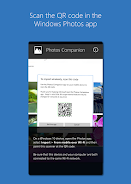
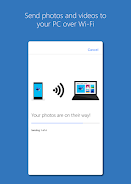
Giới thiệu về Photos Companion, a Microsoft Garage project
hình ảnh Companion
The Microsoft Garage provides employees with avenues to test new ideas and explore customer enthusiasm. The experimental window for Photos Companion, a Microsoft Garage project, will be complete in early June, and it will no longer be supported. This experiment showed the importance of consistent communication between desktop and mobile apps, and our future development efforts will focus on mobile and cloud-first design to take this notion even further.
Photos Companion, a Microsoft Garage project phiên bản mới nhất là gì?
Phiên bản mới nhất của Photos Companion, a Microsoft Garage project là 2018.0301.05.4 (180301054).
Photos Companion, a Microsoft Garage project có miễn phí tải xuống không?
Photos Companion, a Microsoft Garage project miễn phí tải về trên Android, nhưng có thể có mua trong ứng dụng.
Dung lượng file APK của Photos Companion, a Microsoft Garage project là bao nhiêu?
Dung lượng file APK của Photos Companion, a Microsoft Garage project là 52 MB.
Photos Companion, a Microsoft Garage project có an toàn và sạch virus không?
Có, Photos Companion, a Microsoft Garage project hoàn toàn an toàn để tải về và cài đặt. APK được lấy trực tiếp từ Google Play và xác minh bằng chứng chỉ gốc của nhà phát triển.
Cách cài đặt Photos Companion, a Microsoft Garage project trên Android?
Tải APK từ trang này. Mở file vừa tải trên thiết bị Android, cho phép cài đặt từ nguồn không xác định nếu được yêu cầu, sau đó nhấn Cài đặt.