Google Pixel Buds

Google Pixel Buds

Google LLC
v1.0.867833480 (10234001) • Updated Mar 17, 2026
2.7 ★
24,386 Reviews
100,000,000+
دانلودها
Android 6.0+
Requires
AD
نام Google Pixel Buds
نسخه اندروید 6.0
ناشر Google LLC
ژانر. دسته MUSIC AND AUDIO
اندازه 79 MB
Version 1.0.867833480 (10234001)
آخرین بروز رسانی در تاریخ 2026-03-17
دانلودها 100,000,000+
Get it On Google Play


دانلود Google Pixel Buds Android

Download APK (79 MB )

Introductions Google Pixel Buds

The companion app for your Pixel Buds

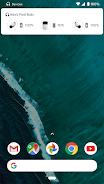
Set up and manage your Pixel Buds right from your Android 6.0+ device with the Google Pixel Buds app. You can easily check your earbuds and case battery levels, and control features like Adaptive Sound, in-ear detection, find device, Google Assistant, and spoken notifications.

Here are some of the things you can do with the Google Pixel Buds app:

• Check battery levels
• Learn how to use touch controls
• Turn on/off Adaptive Sound
• Turn on/off in-ear detection
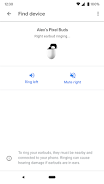
• Ring your earbuds to help find them
• Control your Assistant and spoken notifications
• Get tips & support

To open the Pixel Buds app:
• On Pixel, connect your earbuds > Bluetooth settings > tap the ⚙️next to Pixel Buds.
• On other Android phones, look for the Pixel Buds app icon on your Home screen.

Note: This app is for Google Pixel Buds (2nd Gen)
AD

Download APK (79 MB )

Frequently Asked Questions

What is the latest version of Google Pixel Buds?
The latest version of Google Pixel Buds is 1.0.867833480 (10234001).
Is Google Pixel Buds free to download?
Google Pixel Buds is free to download on Android, but may contain optional in-app purchases.
What is the APK file size of Google Pixel Buds?
The APK file size of Google Pixel Buds is 79 MB.
Is Google Pixel Buds safe and virus-free?
Yes, Google Pixel Buds is completely safe to download and install. The APK is sourced directly from Google Play and verified with the original developer certificate.
How to install Google Pixel Buds on Android?
Download the APK from this page. On your Android device, open the downloaded file, allow installation from unknown sources if prompted, then tap Install.