Google Pixel Buds

Google Pixel Buds

Google LLC
v1.0.867833480 (10234001) • Updated Mar 17, 2026
2.7 ★
24,386 Reviews
100,000,000+
ดาวน์โหลด
Android 6.0+
Requires
AD
ชื่อ Google Pixel Buds
เวอร์ชัน Android 6.0
สำนักพิมพ์ Google LLC
Genre MUSIC AND AUDIO
ขนาด 79 MB
เวอร์ชัน 1.0.867833480 (10234001)
อัปเดตครั้งล่าสุดเมื่อ 2026-03-17
ดาวน์โหลด 100,000,000+
รับมันบน Google Play


ดาวน์โหลด Google Pixel Buds Android

Download APK (79 MB )

Introductions Google Pixel Buds

แอปสำหรับใช้ร่วมกับ Pixel Buds

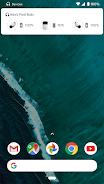
ตั้งค่าและจัดการ Pixel Buds ได้จากอุปกรณ์ Android 6.0 ขึ้นไปด้วยแอป Google Pixel Buds คุณจะตรวจสอบระดับแบตเตอรี่ของหูฟังเอียร์บัดและกล่อง รวมถึงควบคุมฟีเจอร์ต่างๆ ได้โดยง่าย เช่น การปรับเสียงอัจฉริยะ การตรวจจับการใส่หู การหาอุปกรณ์ Google Assistant และการอ่านออกเสียงการแจ้งเตือน เป็นต้น

ตัวอย่างสิ่งที่คุณทำได้ด้วยแอป Google Pixel Buds มีดังนี้

• ตรวจสอบระดับแบตเตอรี่
• ดูวิธีใช้การควบคุมด้วยการสัมผัส
• เปิด/ปิดการปรับเสียงอัจฉริยะ
• เปิด/ปิดการตรวจจับการใส่หู
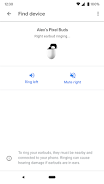
• ทำให้หูฟังเอียร์บัดส่งเสียงเพื่อช่วยให้คุณหาพบ
• ควบคุม Assistant และการอ่านออกเสียงการแจ้งเตือน
• ดูเคล็ดลับและรับการสนับสนุน

วิธีเปิดแอป Pixel Buds
• ใน Pixel ให้เชื่อมต่อหูฟังเอียร์บัด > การตั้งค่าบลูทูธ > แตะ ⚙️ ข้าง Pixel Buds
• ในโทรศัพท์ Android รุ่นอื่นๆ ให้มองหาไอคอนแอป Pixel Buds ในหน้าจอหลัก

หมายเหตุ: แอปนี้มีไว้สำหรับ Google Pixel Buds (รุ่นที่ 2)
AD

Download APK (79 MB )

Frequently Asked Questions

What is the latest version of Google Pixel Buds?
The latest version of Google Pixel Buds is 1.0.867833480 (10234001).
Is Google Pixel Buds free to download?
Google Pixel Buds is free to download on Android, but may contain optional in-app purchases.
What is the APK file size of Google Pixel Buds?
The APK file size of Google Pixel Buds is 79 MB.
Is Google Pixel Buds safe and virus-free?
Yes, Google Pixel Buds is completely safe to download and install. The APK is sourced directly from Google Play and verified with the original developer certificate.
How to install Google Pixel Buds on Android?
Download the APK from this page. On your Android device, open the downloaded file, allow installation from unknown sources if prompted, then tap Install.