Google Pixel Buds

Google Pixel Buds

Google LLC
v1.0.867833480 (10234001) • Updated Mar 17, 2026
2.7 ★
24,386 Reviews
100,000,000+
Downloads
Android 6.0+
Requires
AD
Naam Google Pixel Buds
Android-versie 6.0
Uitgever Google LLC
Genre MUSIC AND AUDIO
Grootte 79 MB
Versie 1.0.867833480 (10234001)
Laatst bijgewerkt op 2026-03-17
Downloads 100,000,000+
Download op Google Play


Download Google Pixel Buds Android

Download APK (79 MB )

Introductions Google Pixel Buds

De bijbehorende app voor je Pixel Buds

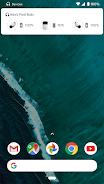
Met de Google Pixel Buds-app kun je je Pixel Buds rechtstreeks instellen en beheren vanaf je apparaat met Android 6.0 of hoger. Je kunt gemakkelijk de batterijniveaus van je oordopjes en case checken en functies bedienen, zoals 'Adaptief geluid', in-eardetectie, apparaat vinden, de Google Assistent en gesproken meldingen.

Je kunt onder andere het volgende doen met de Google Pixel Buds-app:

• Batterijniveaus checken
• Meer informatie krijgen over hoe je de tikbediening gebruikt
• 'Adaptief geluid' in-/uitschakelen
• In-eardetectie in-/uitschakelen
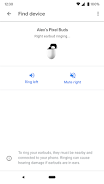
• Je oordopjes laten overgaan om ze terug te vinden
• De Assistent en gesproken meldingen beheren
• Tips en support krijgen

De Pixel Buds-app openen:
• Op de Pixel: Verbind je oordopjes > Bluetooth-instellingen > tik op de ⚙️ naast 'Pixel Buds'.
• Op andere Android-telefoons: Zoek het icoon van de Pixel Buds-app op je startscherm.

Opmerking: Deze app is bedoeld voor Google Pixel Buds (2e generatie).
AD

Download APK (79 MB )

Frequently Asked Questions

What is the latest version of Google Pixel Buds?
The latest version of Google Pixel Buds is 1.0.867833480 (10234001).
Is Google Pixel Buds free to download?
Google Pixel Buds is free to download on Android, but may contain optional in-app purchases.
What is the APK file size of Google Pixel Buds?
The APK file size of Google Pixel Buds is 79 MB.
Is Google Pixel Buds safe and virus-free?
Yes, Google Pixel Buds is completely safe to download and install. The APK is sourced directly from Google Play and verified with the original developer certificate.
How to install Google Pixel Buds on Android?
Download the APK from this page. On your Android device, open the downloaded file, allow installation from unknown sources if prompted, then tap Install.