Google Pixel Buds

Google Pixel Buds

Google LLC
v1.0.680489030 (10183611) • Updated Nov 17, 2024
2.7 ★
20,558 Reviews
50,000,000+
下载
Android 6.0+
Requires
SPONSORED AD
姓名 Google Pixel Buds
安卓版本 6.0
出版商 Google LLC
类型 MUSIC AND AUDIO
尺寸 53 MB
版本 1.0.680489030 (10183611)
最后更新于 2024-11-17
下载 50,000,000+
Get it On Google Play


下载 Google Pixel Buds Android

Download APK (53 MB )

Google Pixel Buds

Introductions Google Pixel Buds

您的 Pixel Buds 的配套应用

Google Pixel Buds

关于Google Pixel Buds的介绍

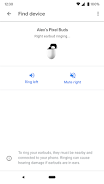
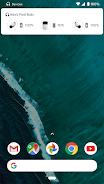
如果您使用搭载 Android 6.0(及更高版本)的设备,就能直接在 Google Pixel Buds 应用中设置和管理 Pixel Buds。您可以轻松地查看入耳式耳机和充电盒的电池电量,还能控制自适应声音、入耳检测、查找设备、Google 助理和语音通知等功能。
您可以通过 Google Pixel Buds 应用实现以下功能:
• 查看电池用量
• 了解如何使用触控功能
• 开启/关闭自适应声音
• 开启/关闭入耳检测
• 让入耳式耳机响铃,方便您找到耳机
• 控制 Google 助理和语音通知
• 获取提示和支持
要打开 Pixel Buds 应用,请按照您的手机对应的步骤操作:
• Pixel 手机:连接入耳式耳机 > 打开蓝牙设置 > 点按“Pixel Buds”旁边的 ⚙️ 图标。
• 其他 Android 手机:点按主屏幕上的 Pixel Buds 应用图标。
注意:此应用适用于 Google Pixel Buds(第 2 代)

如何在Android上下载Google Pixel Buds APK游戏

首先,点击文章下方或文章内的APK下载链接。当您进入下载页面时,选择第一个链接或Google Pixel Buds下载页面中显示的三个链接之一。此外,您还可以通过最后一个链接原始服务器Google Play直接下载。

在Android设备上安装Google Pixel Buds APK游戏的指南

首先,点击下方的APK下载链接。下一步是在页面上选择两个可用的下载链接之一。点击服务器1或服务器2,将APK文件下载到您的Android设备。
SPONSORED AD

Download APK (53 MB )